
Technical Illustration & Visual Communication in Engineering
In modern engineering and manufacturing, documentation must do more than just inform. It must engage, guide and protect. Clear visuals — whether diagrams, exploded views or CAD-derived animations — are essential to reducing errors, improving training and maintaining safety.
This guide explores how technical illustration and visual communication in engineering are evolving to meet these demands, and how forward-thinking teams are using them to drive measurable results.
Table of Contents
What Is Technical Illustration?
Technical illustration refers to precise, functional graphics used to explain how products, systems or machinery work. Unlike general graphic design, it focuses on accuracy, consistency and usability — especially in safety-critical environments.
Illustrations often support:
- Assembly and disassembly guides
- Maintenance and servicing
- Spare parts identification
- Training and onboarding
- Product manuals and SOPs

Why Engineering & Manufacturing Teams Are Making the Shift
Reading dense technical text is not always efficient, especially under time pressure or across language barriers. Visual communication:
Accelerates comprehension
Reduces the risk of human error
Supports compliance with legal standards
Improves training outcomes
Lowers support and downtime costs
In one study by the Information Design Association, teams using illustrated documentation saw 40 per cent faster task completion and 50 per cent fewer user errors.
Common Illustration Styles (and When to Use Them)
1. Line Art
Vector-based, black-and-white or monochrome. Ideal for service manuals and schematics where clarity is key.
2. Isometric Views
Show three dimensions without distortion. Often used in assembly instructions or control system diagrams.
3. Exploded Diagrams
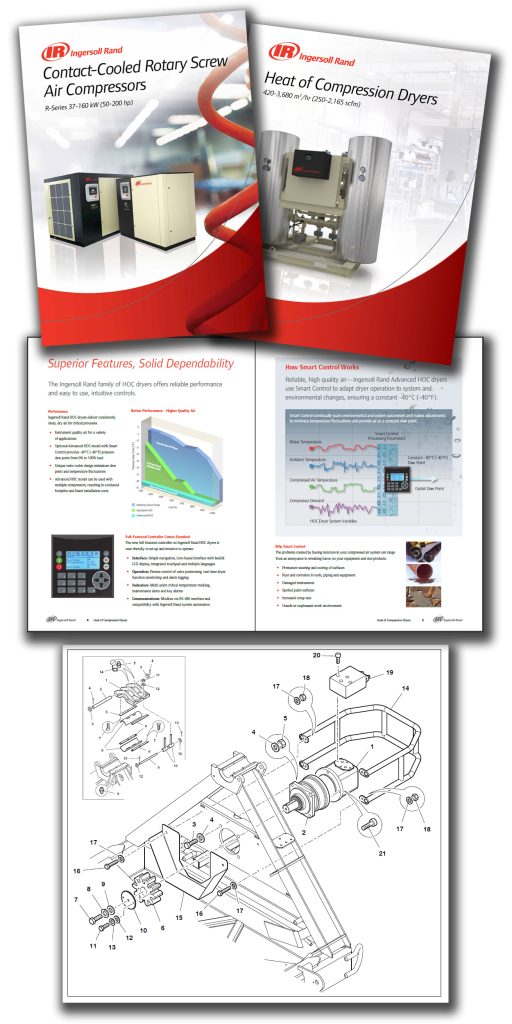
Perfect for illustrated parts manuals. Display complex assemblies with part callouts and bill of materials cross-references.
4. 3D Renders
CAD-derived, photo-realistic visuals used for both training and marketing crossover content.
Explore our 3D Visualisation Services
5. Animated Sequences
Used in digital manuals, e-learning or mobile apps. Especially useful for showing movement, installation or troubleshooting.
Structured Authoring: How Visuals Scale Across Formats
Structured authoring (for example using DITA or XML) allows visual assets to be modular, reusable and format-neutral. Benefits include:
Reuse of graphics across multiple manuals
Synchronised content and visuals
“Change once, update everywhere” capability
Fewer localisation rounds
Instant publishing to PDF, HTML, mobile and augmented reality formats
Engineering Standards That Prioritise Visuals
Your documentation does not just support operations — it reduces liability and improves compliance.
International standards now expect visual clarity in instructions:
IEC 82079-1: General principles for creating clear, consistent technical instructions. Recommends visual aids to improve safety.
ISO 20607: Applies to machinery. Emphasises visuals in risk communication and safe operation guides.
S1000D: Used in defence and aerospace. Standardises how illustrations are tagged, structured and reused.
Failure to meet these standards can delay product approvals or expose your company to risk in the event of an accident.
Let’s Make Your Manuals Work Harder
Want to reduce training time, support costs and compliance risk all at once?
Our visual-first documentation experts work across industries including defence, energy, manufacturing and OEM supply chains.
Visual Communication in Action:
Real-World Examples
A global tool manufacturer integrated exploded diagrams into their digital parts manual. Result: a 40 per cent drop in spare part ordering errors within six months.
A defence supplier used 3D animation for field maintenance training. Compared to classroom-only methods, they saw reduced onboarding time by 60 per cent.
An industrial equipment OEM adopted DITA with CAD-linked illustrations. Translation costs dropped by 32 per cent year-on-year, with updates deployed four times faster.
Visual-First Documentation Trends (2025–2026)
CAD-driven visual workflows: Technical authors now link directly to engineering data. This reduces redraws and speeds up updates.
Mobile-friendly documentation portals: Users expect content that works on tablets and phones, particularly for on-site work.
Interactive manuals: Clickable diagrams, layered illustrations and video explainers are fast replacing static PDFs.
Augmented reality support: Field engineers and technicians increasingly use visual overlays to guide them through installations or repairs.
AI-assisted illustration tools: While not fully autonomous, AI is helping speed up image tagging, content reuse and even translation workflows.
Engineering Manager Outcomes: What You Can Expect
By upgrading visual content and illustration practices, engineering teams benefit from:
Fewer operational errors
Shorter training and onboarding time
Reduced support tickets and miscommunications
Lower translation and update costs
Improved compliance and audit readiness
Better user satisfaction and partner trust
Visual content is not just about “nice diagrams” — it is a strategic documentation asset.
Frequently Asked Questions:
Technical illustration refers to precise, function-driven graphics — like exploded diagrams, isometrics, and line drawings — used to explain how equipment works, how to assemble or maintain it, and how to identify components. These visuals are essential in engineering manuals, parts lists, and training materials.
Visuals reduce the risk of misinterpretation, especially in safety-critical industries. Standards like IEC 82079 and ISO 20607 emphasise the importance of clear diagrams and symbols to help users follow procedures correctly, lowering the chance of human error or injury.
Common types include line drawings (ideal for schematics), isometric views (for spatial clarity), exploded views (for parts manuals), and 3D renders (for realism and training). Each serves different purposes based on the audience and content type.
Yes. Language-neutral visuals reduce the amount of text that needs translating. Structured authoring systems also allow reuse of visuals across multiple languages and formats, making updates faster and localisation more cost-effective.
Visuals can be stored as modular, referenced assets within a DITA or XML structure. This means a single image can be reused across multiple topics or outputs. Proper file naming, metadata tagging, and format consistency are key to efficient integration.